Pretty local domains
Every folder gets its own https://<name>.test, wired up with dnsmasq + Caddy.
A tiny, brew-based alternative to heavyweight local-server apps for macOS.
Trusted HTTPS, the runtime you pick — PHP, Node, or a zero-runtime static server —
and optional MySQL, from a handful of shell scripts. Run fs serve and you're live.
fs serve — default PHP, served, browser opens.No Electron, no bundled Chromium, no always-on menu-bar app — just Caddy and a handful of shell scripts that run only while a site is up. It stays out of the way, so it runs smoothly even on modest, low-memory Macs where heavier local-server apps would crawl.
Pretty domains, trusted HTTPS, and per-project runtimes — without the bloat of a menu-bar app.
Every folder gets its own https://<name>.test, wired up with dnsmasq + Caddy.
Real, browser-trusted certificates per site with mkcert — no warnings, green padlock every time.
One setting per folder: any brew-installed PHP (8.3–8.5+), a Node dev server, or a plain static server with no runtime at all.
Proxy a live dev server (Vite, Astro, Next…) with hot reload, or serve its production build — auto-detects the real port.
Opt in per project with db=on — the database and user are auto-provisioned on fs up.
Flip lan=on to also serve over the LAN at https://<mac>.local with a trusted cert.
Front-controller rewrites for WordPress, Laravel, Symfony — set rewrite=index.php and go.
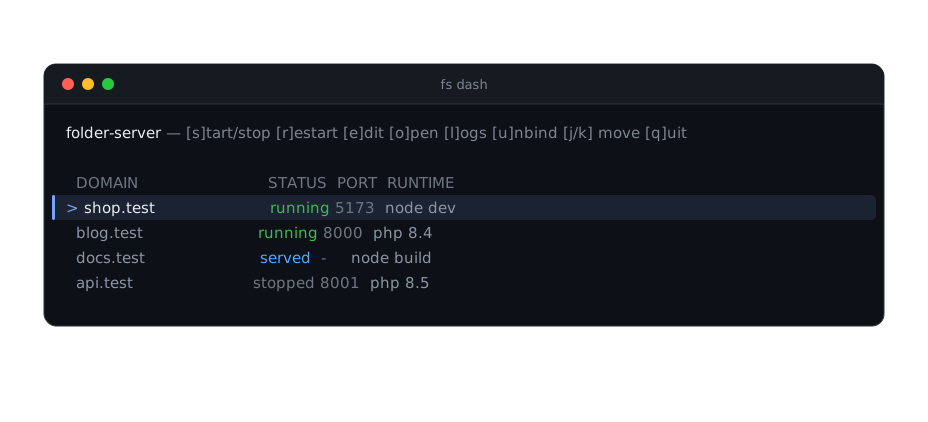
Start, stop, edit config, tail logs and unbind — every site, all from fs dash.
Guided install, setup, fix, and uninstall scripts that never surprise you.
A live terminal dashboard lists every site with its status, port, and runtime. Move with j/k and act on the row under the cursor — no context switching.
macOS with Homebrew — that's it for static sites. For PHP or Node projects, install the runtime you need (e.g. brew install php).
Prefer explicit control? fs init walks you through PHP or Node, routing, and MySQL,
then fs up serves it. Full command reference lives in the
README.
Free, open-source, and built on Homebrew. Clone it, run fs setup, and serve your first folder in a couple of minutes.